
Are your welding helmet sensors not working when you need them most? It’s frustrating and even dangerous when your auto-darkening helmet fails to respond properly.
You rely on those sensors to protect your eyes instantly from harmful sparks and bright arcs, but what happens when they stop doing their job? Don’t worry, you’re not alone, and this issue can often be fixed without replacing the entire helmet.
You’ll discover the common reasons why your welding helmet sensors might be failing and simple steps you can take to get them back in perfect working order. Keep reading to protect your vision and get back to welding safely and confidently.
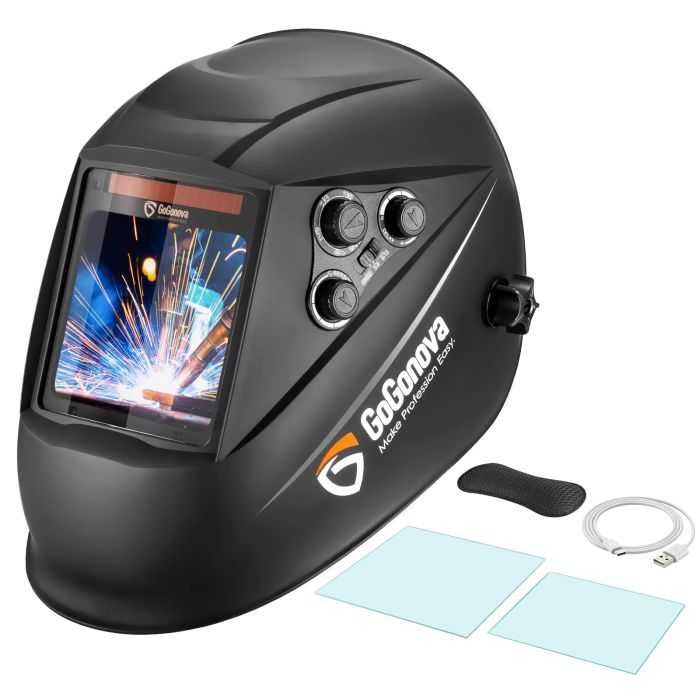
Credit: igogonova.com
Common Sensor Problems
Welding helmet sensors play a key role in protecting your eyes during welding. These sensors detect the bright arc and darken the lens automatically. When sensors fail, the helmet may not darken properly. Understanding common sensor problems helps you identify and fix issues quickly. This keeps your welding safe and efficient.
Below are some frequent sensor problems that cause welding helmets to malfunction.
Dirty Or Obstructed Sensors
Sensors get dirty from dust, smoke, and welding debris. Dirt blocks light, so sensors cannot detect the arc. Wiping sensors gently with a soft cloth can restore their function. Avoid harsh chemicals that might damage the sensor surface. Keep sensors clear for reliable helmet performance.
Battery Issues
Many welding helmets use batteries to power sensors and auto-darkening features. Weak or dead batteries cause sensors to stop working. Check battery charge regularly and replace batteries as needed. Poor battery contacts also affect sensor function. Clean battery terminals to ensure good connection.
Low Welding Current Effects
Welding at a very low current may not trigger sensor activation. Sensors need a certain light intensity to react. If the current is too low, the lens may not darken properly. Adjust the welding current or increase sensor sensitivity if possible. This helps sensors work correctly at lower settings.
Damaged Or Dead Sensors
Sensors can break from impacts or wear over time. A damaged sensor will fail to detect the welding arc. Signs include uneven darkening or no darkening at all. Replace broken sensors to restore helmet safety. Regular inspection helps catch sensor damage early.

Credit: www.amazon.com
Quick Sensor Cleaning Tips
Keeping welding helmet sensors clean is vital for proper function. Dirt, dust, and grime can block sensors. This causes the auto-darkening feature to fail or respond slowly. Quick sensor cleaning helps maintain clear visibility and safety during welding. Follow simple steps for fast and effective cleaning.
Using Soft Cloth And Mild Cleaners
Use a soft, lint-free cloth to clean the sensors. Avoid rough materials that can scratch sensor surfaces. Slightly dampen the cloth with water or mild soap. Gently wipe the sensor covers and surrounding areas. Never spray cleaners directly on sensors. Dry the sensors with a clean cloth after wiping.
Avoiding Scratches On Sensor Covers
Scratches reduce sensor sensitivity and accuracy. Use only soft cloths for cleaning. Do not use abrasive pads or brushes. Store the helmet in a safe place to avoid damage. Check sensor covers regularly for cracks or scratches. Replace damaged covers immediately to protect the sensors.
Regular Maintenance Schedule
Clean the sensors after every use or at least weekly. Inspect sensors for dirt, cracks, or damage regularly. Keep a cleaning kit handy near your welding station. Set reminders to maintain sensor cleanliness. Regular care extends sensor life and ensures consistent helmet performance.
Battery Troubleshooting
Battery issues often cause welding helmet sensors to fail. Checking the battery is the first step in troubleshooting. Proper battery care keeps your helmet working reliably. This section covers how to check battery charge, replace batteries correctly, and care for solar-powered helmet batteries.
Checking Battery Charge And Placement
Start by inspecting the battery charge. A low battery can stop the sensors from working. Use a battery tester or multimeter to check the voltage. Make sure the battery is fully charged before use.
Also, verify the battery is placed correctly. The battery terminals must connect firmly. Loose or reversed batteries can cause sensor failure. Remove and reinsert the battery to ensure proper contact.
Replacing Batteries Correctly
Use the exact battery type recommended by the helmet manufacturer. Avoid mixing old and new batteries. Insert the new batteries with the correct polarity. Check for corrosion or dirt on the battery contacts and clean them gently.
Secure the battery cover properly. A loose cover can cause poor battery connection. Follow the helmet manual instructions for safe battery replacement.
Solar-powered Helmet Battery Care
Solar-powered helmets have batteries that charge from light. Keep the solar panel clean and free of dust. Dirt on the panel reduces charging efficiency.
Avoid storing the helmet in dark places for long periods. Without light, the battery can drain and lose capacity. Regular use in good light conditions helps maintain battery life.
Adjusting Helmet Settings
Adjusting the settings on your welding helmet can fix sensor problems quickly. Many helmets have sensitivity and auto-darkening settings. Changing these can help the sensors detect the welding arc better. Testing the lens indoors also lets you check if the helmet responds correctly.
Increasing Sensor Sensitivity
Sensor sensitivity controls how well the helmet detects light from the welding arc. Low sensitivity may cause the helmet to not darken on time. Increase the sensitivity to make sensors more responsive. Use the helmet manual to find the sensitivity adjustment. Turn the dial or press the button to raise sensitivity. Test the helmet after changing the setting to confirm it works. Avoid setting the sensitivity too high to prevent false triggers.
Resetting Auto-darkening Functions
Auto-darkening functions may stop working due to errors or glitches. Resetting the helmet can restore normal sensor function. Locate the reset button or remove the battery to power off the helmet. Wait a few seconds before turning it back on. This action clears any temporary faults in the system. After reset, test the lens to see if it darkens properly. Resetting often fixes minor issues without needing repairs.
Testing Lens Response Indoors
Testing your helmet indoors is safe and easy. Use a bright flashlight or a welding simulator if available. Shine light directly on the sensors to check lens reaction. The lens should darken quickly when light hits the sensors. If it does not change, adjust settings or clean the sensors. Regular indoor tests ensure your helmet is ready before welding outside. Keep testing to avoid surprises during actual work.
Repair And Replacement Options
Repair and replacement options for welding helmet sensors are crucial to keep your gear reliable. Sensors detect the welding arc and darken the lens automatically. When sensors stop working, safety and welding quality suffer. Understanding repair and replacement choices helps maintain your helmet’s performance and extends its life.
When To Replace Sensors
Replace sensors if they no longer detect light accurately. Cracked or damaged sensors cause erratic lens darkening. Sensors that fail after cleaning usually need replacement. Old helmets with sensors that respond slowly also require new parts. Sensor replacement restores proper auto-darkening function and protects your eyes.
Diy Fixes For Sensor Contacts
Sensor contacts sometimes get dirty or loose. Clean contacts gently with a soft cloth or rubbing alcohol. Tighten any loose screws that hold the sensors in place. Avoid harsh chemicals that damage sensor surfaces. After cleaning, test the helmet in a bright light. Simple fixes often restore sensor function quickly and cheaply.
Professional Repair Services
Professional services diagnose sensor and electronic issues precisely. Experts can replace sensors and repair wiring defects safely. They may recalibrate the helmet to factory standards. Professional repair ensures the helmet meets safety rules. Choose certified technicians to keep your helmet reliable and secure.

Credit: www.directindustry.com
Safety Tips While Troubleshooting
Troubleshooting welding helmet sensors requires careful attention to safety. The helmet protects your eyes and face from sparks, UV light, and intense heat. Never ignore safety steps during repairs or checks. Follow these tips to stay safe while fixing your helmet.
Avoiding Welding Without Proper Protection
Do not weld if your helmet sensors are not working. The helmet must darken to protect your eyes. Welding without this protection can cause serious eye injury. Always wait until the helmet is fully functional before starting work. Use a different helmet if needed to ensure safety.
Regular Helmet Inspection
Check your welding helmet often for damage or sensor problems. Look for cracks, loose parts, or dirt on sensors. Clean sensors gently with a soft cloth. Replace batteries regularly to keep sensors active. Early inspection helps prevent accidents and sensor failure during welding.
Backup Safety Gear Recommendations
Keep extra safety gear ready in case your helmet fails. Use safety glasses with side shields as a backup. Have a face shield or welding goggles available nearby. These items offer protection while you repair your helmet. Always prioritize safety over speed when fixing sensor issues.
Frequently Asked Questions
What Can Cause Auto-darkening Filters To Malfunction?
Auto-darkening filters can malfunction due to dirty or blocked sensors, dead or improperly installed batteries, and low welding current.
How To Tell If Welding Helmet Battery Is Bad?
Check if the lens fails to darken during welding. Test with new batteries. Clean sensor surfaces and battery contacts. Replace battery if problems persist.
Where Are The Sensors On A Welding Helmet?
Sensors on a welding helmet sit near the top edge of the lens area. They detect welding arc light to trigger auto-darkening. Keep sensors clean and unobstructed for proper function.
Conclusion
Welding helmet sensors need care to work properly. Dirt and low battery often cause sensor problems. Clean sensors gently and replace batteries regularly. Adjust sensitivity if the lens does not darken. Always test your helmet before starting work. A working sensor keeps your eyes safe during welding.
Taking small steps can fix most sensor issues fast. Stay safe and keep your gear in good shape.

Hi, I’m Zachary Ford. I’m passionate about welding and dedicated to helping both beginners and experienced welders make informed decisions. I research, test, and write about welding helmets, welding machines, safety equipment, and essential workshop tools. My goal is to provide honest reviews, practical buying guides, and easy-to-follow tutorials that help you weld more safely, work more efficiently, and choose the right gear with confidence.